.png&w=1280&q=75)
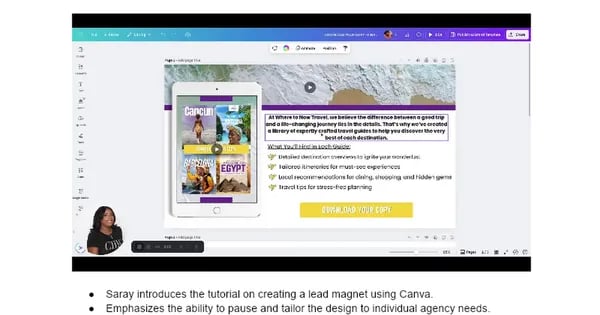

Have you ever downloaded a lead magnet that felt like it was designed by a committee of sleepy robots? Same here. That’s why I’ve always tried to inject a little personality—even a dash of quirk—into the designs I create for my clients. On a humid summer night last July, I helped my friend Kelly at where2nowtravel break out of template purgatory and create a guide that actually felt alive. Here’s how you can do the same in Canva, minus the robotic vibes.
The Unspoken Power of Backgrounds: More Than Just a Canvas
Ever notice how a static background can make your lead magnet feel flat? Here’s a video background tutorial tip: try searching “beach” in Canva Pro’s video library. A calming beach video instantly adds emotion and depth—especially powerful for travel marketing. In my experiment, I positioned the video to highlight rushing water, and the effect was surprisingly engaging. But don’t just pick what looks pretty. Find media that fits your audience’s vibe, not just your own taste. Sometimes, a subtle pattern or muted texture works better than a splashy video. Remember, brand consistency matters, even with dynamic visuals. As Saray says:
“A background should amplify your message, never compete with it.”
So, always match the mood to your message. With the right background, your Canva lead magnet design tips will truly stand out.
Branding Isn’t Just a Logo: Little Details, Big Impact
When customizing Canva templates for your next lead magnet template, remember: branding is in the details. Start by anchoring your design with a bold color block—like the yellow rectangle added at 00:03:35. Don’t just copy your client’s palette; match it exactly. (Trust me, I once used the wrong shade of teal and my client’s reaction was unforgettable!) These little touches—color-matched overlays, grouped elements for easy editing, and structured layouts—keep your text and video from fighting for attention.
Experiment with partial overlays for subtle, on-brand accents. And if you’re updating brand elements across multiple Canva templates, group them at 00:13:17 for consistency. Research shows that consistent use of branded elements across your lead magnet pages builds trust and recognition. As Kelly from where2nowtravel says,
"Details make the design – it’s where your brand comes alive."
Getting Playful with Graphics: The Art of iPad Mockups and Travel Covers
When it comes to inserting graphics in Canva for your mini ebook lead magnet structure, picking the right device mockup is key—skip those awkward floating hands! Search for a clean iPad graphic (added at 00:04:26), then import your travel guide covers (at 00:06:31). Resize and crop each cover so it fits snugly inside the iPad, avoiding any wonky edges. Honestly, I once spent 20 minutes fixing a crooked cover, only to realize my iPad was upside down. Oops.
Next, adjust the video background’s transparency (at 00:08:10) to prevent visual overload. There’s a real sense of satisfaction when everything lines up just right—celebrate that moment! Whether you choose realistic graphics or playful, illustrated options, remember:
“Mockups are like stage props — they set expectations for content quality.” – SarayResearch shows these visuals boost travel marketing design conversions.
Call-to-Action Buttons: Your Digital Welcome Mat
Designing call to action buttons in Canva is where your lead magnet truly comes alive. Start by adding a rectangle for your ‘Download Your Copy’ button—rounded corners and your brand colors keep it inviting, not overwhelming. At 10:05 in the tutorial, this step sets the tone. Next, format the button text: adjust the font, color, and add a subtle shadow for just enough depth (but don’t overdo it). If your first ‘Download’ button doesn’t pop, rewrite it—sometimes it takes three tries before it clicks. Group your CTA with other elements for easy drag-and-drop edits. Trust your gut on button size; templates are just a starting point. Research shows that a simple color tweak, like a bold orange, can double your click rates.
“Small tweaks to call-to-action buttons can increase downloads tenfold – don’t settle for your first draft.” – Saray
The Unsung Art of Spacing and Alignment: Avoiding the ‘Everything Everywhere’ Chaos
When designing lead magnets in Canva, resisting the urge to fill every inch is key. White space is like air for your ideas – don’t suffocate your message. – Saray. Start by adding your opening message and benefits (around 15:37 in the tutorial), but leave generous space around text boxes. For bullet points, align each one with an icon—like a bright little plane—for extra visual appeal (see 19:04). It’s tempting to rush, but my process always begins messy. Only after a few tweaks—using invisible rectangles as alignment guards—does everything snap into place. Don’t forget to check symmetry and adjust your call-to-action button’s size (23:22). Sometimes, the best alignment happens when you return with fresh eyes the next morning. Research shows that aligning design elements and using white space not only boosts readability but makes your lead magnet look polished and professional.
Just Because You Can, Doesn’t Mean You Should: Decorative Elements and Restraint
When designing lead magnets in Canva for marketing, it’s tempting to add every fun element you find. But here’s the secret: less is more. Try adding playful, on-brand décor—like a subtle shadow globe (added at 24:13 in the tutorial)—but always adjust transparency so your engaging visuals in Canva don’t overpower your content. I once let a globe graphic nearly swallow my headline; lesson learned! Listen to that elusive designer’s gut feeling to know when your canvas is truly done.
Pick one wild card element, not five. Trust your instincts over any checklist, because your brand’s personality is unique. As Kelly says,
“One or two decorative touches go a long way—think impact, not clutter.”
Research shows that selective use of decorative graphics supports visual interest without compromising clarity. Stay focused on your message.
The Human Touch: Experimentation, Iteration, and the Future ‘You’
When you dive into any Canva lead magnet tutorial, remember: it’s not about copying a template—it’s about pausing, experimenting, and making tweaks for your real audience. Creating lead magnets for client projects in Canva means thinking beyond your screen. Will your design feel like a gift or just another transaction? Imagine your guide printed and mailed—would it still shine? Research shows that iterative testing and real feedback make your lead magnets more memorable and effective. So, don’t be afraid to hit pause and try something wild. As Saray says,
"Never be afraid to hit pause and try something wild — the best designs often come from experiments gone right."For more hands-on guidance, check out the Loom tutorial: watch here. Thanks for reading—now remix your guide for your next big campaign!
