.png&w=1280&q=75)

If you’ve ever spent half an hour wrestling with a design tool only to end up with something that looked like a school art project, you’re not alone. A few years ago, I tried making my first digital freebie and, well, let’s just say mom politely said, "It’s…colorful!" Thankfully, Canva exists. For travel agents trying to actually wow clients—from dreamers to doers—knowing how to whip up striking lead magnet graphics can be the difference between "meh" and "more bookings." Let’s ditch bland PDFs for good. Here’s a real-world approach (with some friendly detours) to making your next lead magnet shine.
Why Travel Agents Should Even Care About Canva Graphics (Hint: It’s Not Just for Pinterest)
If you want your lead magnet to stand out, you need more than just information—you need eye-catching Travel Agent Graphics. Today’s browsers are skimmers, so your Lead Magnet Design must grab attention fast. First impressions matter: bad graphics, bad rep. Think about it—a friend of mine booked a trip after seeing a vibrant, branded lead magnet on Instagram. That’s the power of great Lead Magnet Graphics. It’s not just about looks, either. Research shows that clear, professional Canva Templates lead to more downloads and, ultimately, more clients. Consistent branding builds trust and keeps your agency’s vibe strong across all Travel Agent Lead Magnets. Even a little branding goes a long way, and Canva’s templates are a hidden treasure for travel agents.
Visual identity is the first handshake with your traveler. Make it a firm one. – Jane Doe, Travel Marketing Strategist
The Art of Imperfect Canva: Letting Go of Perfection (and Embracing Video Backgrounds)
Ready to ditch boring lead magnet graphics? Start with a blank slate in Canva—even if it feels intimidating. Pull in an energetic Canva Video Background (think: a calming beach escape) to instantly boost engagement. Research shows that a little motion grabs attention and keeps prospects interested, especially for travel marketing graphics. Just double-check your video choice—accidentally setting a volcano instead of a beach? Not so relaxing!
Next, layer in your brand colors using simple shapes. Don’t be afraid to play with textures and overlays. The secret? Aligning elements in Canva makes your design look polished, not homemade. Even basic rectangles and icons, when properly placed, can elevate your lead magnet graphics. As Olivia Grant, Digital Branding Coach, says:
Motion in your marketing is motion in your sales funnel.
Let go of perfection and have fun experimenting!
The Secret Sauce: Embedding Travel Guide Covers for Real-World Relatability
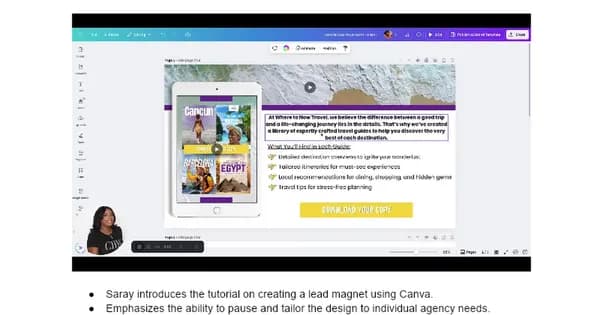
Want your lead magnet graphics to stand out in travel agent marketing? Start by uploading your best Travel Guide Cover designs into Canva. Choose the ones you’re truly proud of—these are your showpieces. Next, drop your cover into a realistic iPad frame or device mockup. This simple trick instantly signals value and legitimacy to prospects, making your digital assets feel tangible and trustworthy.
Clients love seeing their own guides displayed like this; I’ve watched their excitement grow when their brand shines in a polished mockup. Adjust the transparency so your guide cover pops but still blends smoothly with the background. Research shows that realistic device graphics build authority and trust far better than generic stock images. As Lara Kim, Creative Director, says:
Seeing is believing—show, don’t just tell your prospects what they’re getting.
Let your Canva templates do the talking!
Button Up: How a Killer Call-to-Action Changes Everything (and a Little Copy Humor Helps)
Ready to turn browsers into leads? Start with a Call-to-Action Button Design that pops but still fits your agency’s vibe. In Canva, use a bold rectangle shape, style it with your brand colors, and skip the boring “Submit.” Instead, try something like “Download Your Dream Guide”—it’s friendlier and way more inviting. Research shows that strong Lead Magnet Call-to-Action buttons sharply increase conversions on lead magnet pages.
Don’t forget to hyperlink your button so prospects land exactly where you want them. Place it front and center—never let it get lost in a cluttered layout. Think of your CTA as the punchline to your design’s story. As Samantha Lee, Agency Copywriter, puts it:
Your call-to-action is your handshake invitation—make it memorable.
Even a simple switch from plain text to a bold, friendly button can boost downloads and engagement.
Tiny Details with Huge Impact: Icons, Spacing, and Wrangling Order in Canva
Ready to make your lead magnet design pop? Start by hunting down the perfect icon in Canva—think planes, globes, or suitcases. Using icons in Canva as bullet points instantly boosts visual engagement and keeps your travel marketing graphics fresh. Ditch the boring dots and swap in fun images; your readers will notice.
When aligning elements in Canva, keep icons tidy, but don’t stress over perfection. Sometimes, a slightly quirky angle draws the eye and sparks curiosity. Before finishing, group and align everything for a polished look, but expect to nudge things around—micro-adjustments matter. Want an extra touch? Drop in a shadow element behind your icons for unexpected sophistication and depth.
Details aren’t the cherry—they’re the sundae. – Michael Tran, Branding Specialist
Research shows that well-chosen iconography and spacing can turn any lead magnet design into a professional-looking resource.
Mistakes to Make (and Keep): Learning, Improvising, and Sharing Your Quirky Design Journey
When diving into Lead Magnet Design with Canva Features, don’t chase perfection. Each attempt is a step forward—your graphics will improve with every iteration. Keep a running list of what you’d tweak next time, and don’t forget to celebrate those small wins. Embrace your quirks; authenticity is magnetic in Travel Agent Marketing. Maybe you’ll laugh at your old Comic Sans phase, but that’s part of your story!
Share your lead magnets on social media for honest feedback before launching a big Lead Magnet Promotion. Research shows that iterative design and personal branding help you connect with potential clients on a deeper level. As Jordan Myers, Agency Owner, puts it:
The best thing I ever did was show my early designs to friends—they laughed, I learned.
Don’t let imperfection hold you back—every design is a new opportunity to connect.
Quickfire Travel Agent Canva Hacks (to Save Your Sanity)
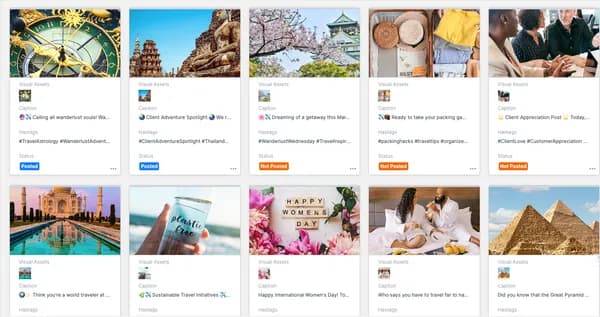
If you want to create standout Travel Agent Graphics in Canva without losing your mind, it’s all about working smarter, not harder. Master those Canva Design Shortcuts—Ctrl+Z will be your best friend when you need to undo a slip. Don’t forget to save your project every ten minutes; Canva crashes can happen to anyone. When you’re tweaking Travel Marketing Graphics, duplicate pages and elements to test new ideas quickly. Batch upload your assets to keep everything organized, and always keep your branding file handy for color and font consistency. Still, don’t be afraid to improvise—a spontaneous tweak can make your lead magnet pop. Research shows that productivity shortcuts and design consistency make your work look professional and get it done faster. As Nora Bennett puts it,
Productivity isn’t about speed; it’s about stacking small wins.
